A feedback note deserves a receipt
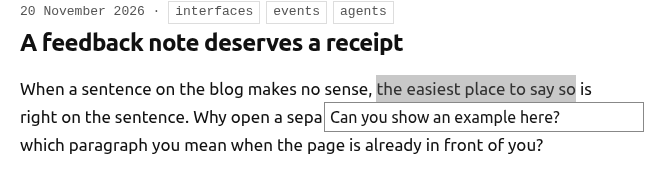
When a sentence on the blog makes no sense, the easiest place to say so is right on the sentence. Why open a separate chat, paste a link, and explain which paragraph you mean when the page is already in front of you?
On iterate, a mind is the code it runs, the apps it serves, and the event streams that connect them. That means the mind that publishes a page can also receive a note about it and assign the work to an agent. The note goes from the place where you noticed the problem to the mind that can fix it.
What page feedback is for
On the blog and in Lion, a signed-in member can highlight text, open the feedback box, and leave a short note. Say a game tells you “Try again” after a move and you can't tell why. Select those words and ask for a clearer explanation. The submission keeps the note, the exact words you picked, and a small snapshot of the surrounding page. It's not a public comment thread: it's a private way to point the mind at something that needs attention, without having to reconstruct the scene in another app.
The first version on the blog saved notes for the next daily writer. That worked for editorial suggestions, but it meant waiting for a scheduled run even when the fix was obvious. Trying the same interaction in Lion helped separate the idea from the blog: a note about a game can be a small job for an agent just as readily as a note about a paragraph. Now the mind owner's notes go through the same router as their other requests. The router gives the agent the note to act on and the page context to look at.
That raised a second question: if you close the tab while the agent is working, how do you find out what happened? The browser keeps a receipt for that one note, so you can return later and see whether it was picked up or resolved. To make that work, we needed two things: a way to identify what you pointed at, and a way to follow the outcome without opening the whole inbox.
A selection is not just a string
Imagine a page that says “Try again” twice, once beside a form and once in a footer. Sending only those two words would make the note ambiguous. Sending a long chain of child positions would make it brittle. The widget pairs the literal selection with a selector that's unique when captured, the local text offsets, and a short branch of roles. It prefers semantic anchors; Playwright's locator guide gives a good account of why a chain of positions is a poor first choice. No anchor here promises to survive a redesign.
The widget also includes a bounded snapshot of visible page context. It skips marked private regions, hidden content, frames and typed control values. That still leaves visible prose, which may itself be sensitive. The snapshot is private and goes to the agent as quoted evidence, not as instructions. A site that adds the widget needs to decide what its pages should let the widget capture. Redacting common credential patterns is not a substitute for that decision.
Follow one note, not the inbox
The server checks membership and appends the submission before returning its receipt. The usual router can then assign the owner's note to an agent. Only the assigned agent can mark it resolved. The browser sees the routing and resolution events on a stream dedicated to that receipt, authorized to the original submitter on the original host. It doesn't subscribe to the shared stream. That split lets the interface show what happened without making the inbox part of the frontend API.
The first live version looked fine in a test and then showed no updates even though the events were already there. The test socket let us pass a replay offset to the subscription. The restricted socket did not. The fix was to make the test reject that option too, then separate listening from replay:
// Pseudocode; the server has already authorized this receipt.
async function follow(receipt, savedCursor) {
  const accept = event => applyOnce(event.offset, event);
  await receipt.subscribe({
    consumes: ["feedback/routed", "feedback/resolved"],
    target: accept,
  });
  for await (const page of readPages(receipt, savedCursor)) {
    for (const event of page.events) accept(event);
    saveReadCursor(page.after);
  }
}
Subscribing first closes the gap between reading history and listening for the next event. It introduces overlap instead: a live event may also turn up in the read. This is another case where reading back the stream matters more than trusting the arrival order. Advance the catch-up cursor from the read, not from the largest live offset you've seen. The browser separately remembers whether the resolution was opened, so a note finished while the tab was closed can still show up unread.
The shared script was the easy part to reuse. The useful contract is smaller than a comment system: one anchored submission, one durable receipt, and a way to find out what happened to it without seeing anyone else's.